
Cómo pagar con Tarjeta (Mercuryo)
Guía en Español
Lo único que necesito de ti, es muy fácil:
- Me pides mi dirección de Bitcoin (BTC) por WhatsApp y yo te la envío.
- Tú compras BTC en Mercuryo y lo envías a esa dirección BTC.
- Me mandas el TXID o la captura de pantalla del "Sent/Withdraw" y yo te entrego los Tibia Coins.
Métodos de pago disponibles:
- 💳 Visa / Mastercard
- 🍎 Apple Pay
- 🇬 Google Pay
- 💸 Revolut Pay
Comprar ahora mismo en 4 Pasos:
Abre Mercuryo.io y haz clic en Buy Crypto.
Coloca el monto en USD de los Tibia Coins y selecciona BTC (Bitcoin) como la crypto.
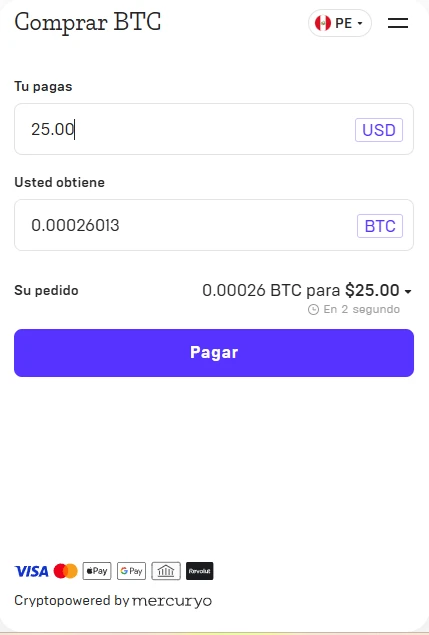
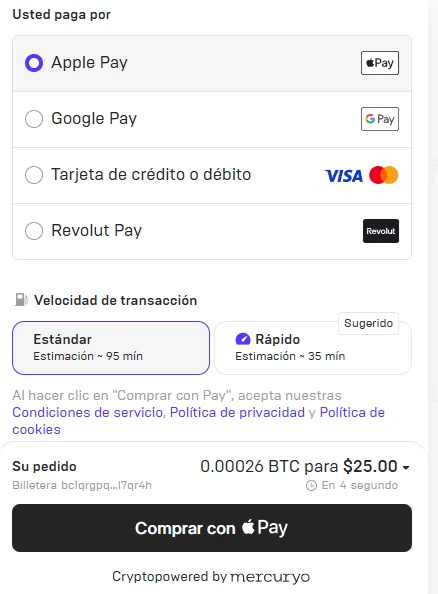
Pega la dirección BTC (Solicitar en el WhatsApp). Asegúrate de haberla puesto completa (revisa el primer y último carácter).
Selecciona el método de pago de tu preferencia. En velocidad de transacción (Speed), elige: Rápido (Fast).
📋 Verificación KYC (Importante):
- El sistema te pedirá que verifiques tu email.
- En algunos casos, harán verificación de identidad (Si estás en USA, piden SSN). Debes contar con tu teléfono y documento legal a la mano.
- Nota: Normalmente no hay verificación KYC estricta cuando los montos son menores de $700.
🚨 Notas Extra:
- Apple Pay / Google Pay tienen un límite de 2000 euros diarios.
- Si vas a pagar con tarjeta VISA/Mastercad, asegúrate de que tu banco sea crypto-friendly.
📍 Yo te doy la billetera BTC para el pago. Si no la tienes a la mano, escríbeme y listo.
English Guide
The only thing I need from you, it's easy:
- Ask me for my Bitcoin (BTC) address via WhatsApp and I will send it to you.
- You buy BTC on Mercuryo and send it to that BTC address.
- Send me the TXID or a screenshot of the "Sent/Withdraw" and I will deliver your Tibia Coins.
Available payment methods:
- 💳 Visa / Mastercard
- 🍎 Apple Pay
- 🇬 Google Pay
- 💸 Revolut Pay
Buy right now in 4 Steps:
Open Mercuryo.io and click on Buy Crypto.
Enter the USD amount for the Tibia Coins and select BTC (Bitcoin) as the crypto.
Paste the BTC address (Request on WhatsApp). Make sure you entered it completely (check the first and last character).
Select your preferred payment method. For transaction speed, choose: Fast.
📋 KYC Verification (Important):
- The system will ask you to verify your email.
- In some cases, they will request identity verification (If you are in the US, they ask for SSN). Have your phone and ID ready.
- Note: Usually there is no strict KYC verification for amounts under $700.
🚨 Extra Notes:
- Apple Pay / Google Pay have a maximum limit of 2000 euros daily.
- If paying with a VISA/Mastercard, make sure your bank is crypto-friendly.
📍 I will provide the BTC wallet address for your payment. Just text me!
¿Todo Claro? / All Clear?
Elige tu juego y ve directo a la caja. / Choose your game and head straight to checkout.
